
Never Lose Anything in Storage Again: The QR Code Box Tracking Method
Imagine being able to point your phone at any box in your storage unit and instantly see a full list of everything inside it. No digging. No guessing. No "I know it's in one of these boxes somewhere."
That's exactly what QR code box tracking gives you — and it's easier to set up than you might think. This guide walks you through the whole system, from first box to fully organized storage, using a completely free app.
What Is QR Code Box Tracking?
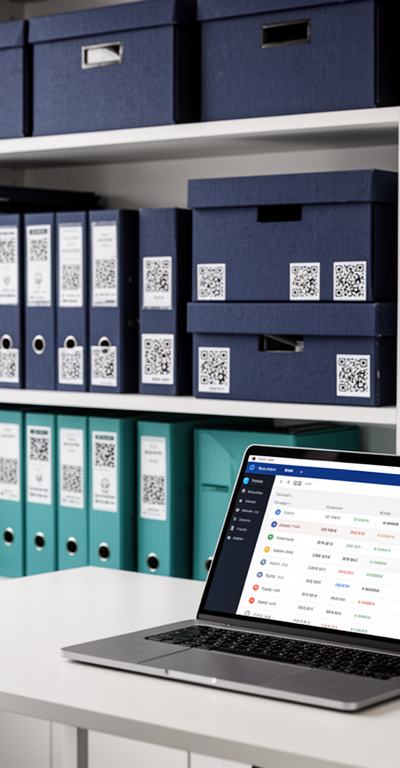
QR code box tracking combines a digital inventory system with printed QR code labels. Each box gets a unique QR code sticker. When you (or anyone else) scans it with a smartphone, the full contents list for that box appears on screen immediately.
No app download required for scanning. No account. No password. Just point, scan, and see.
The contents list lives in the cloud, which means it's always accurate, always accessible, and searchable from anywhere — even if you're not standing in front of the box.
Why QR Codes Beat Traditional Box Labels
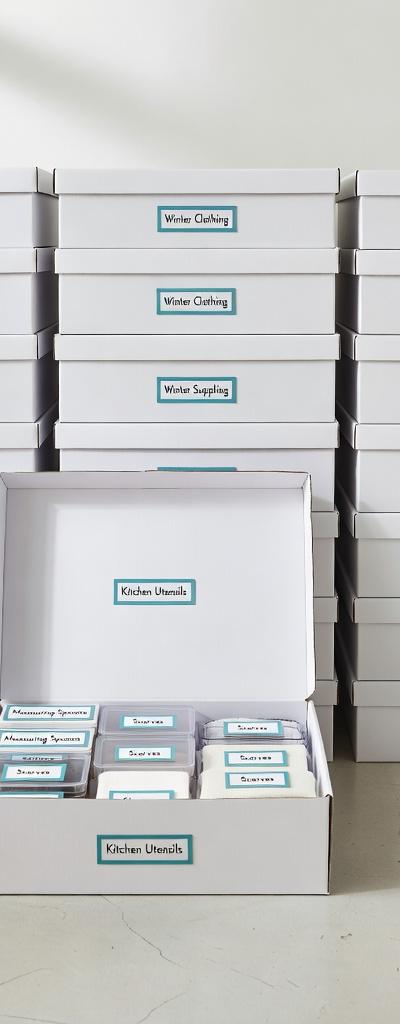
Handwritten labels have been the default for generations. They work, up to a point. But they have hard limits:
Space is limited. You can fit maybe 5–10 items on a box label before it becomes unreadable. Most boxes have more than 10 things in them.
They can't be updated. Once you've written a label, it's fixed. If you add or remove items from the box, the label is immediately inaccurate.
They're not searchable. If you're looking for a specific item across 25 boxes, you have to read 25 labels. A QR code system lets you search from your phone and find it instantly.
They're not scannable. A QR code can be scanned in a split second. Reading a handwritten label in a dimly lit storage unit is less fun.
They can't be shared easily. With QR codes, anyone with a phone can scan a box and see what's inside. No shared document, no asking someone to read you the label over the phone.
Setting Up QR Code Box Tracking With Smart Box List
Smart Box List includes built-in QR code label printing. It's free to use, and setup takes less than an hour even if you have a lot of boxes. Here's the process:
Step 1: Download Smart Box List
Smart Box List is free and available on any device. No subscription required. Create an account (just an email address) and you're ready to go.
Step 2: Create Your First Box
Tap to create a new box. Give it a name — something descriptive like "Kitchen Tools," "Winter Clothes," or just "Box 1" if you prefer numbered storage. You can always edit the name later.
Step 3: Add Items to the Box
As you pack each item into the box, type it into Smart Box List. Brief descriptions work best — "Large mixing bowl," "Winter duvet," "External hard drive."
The more specific you are, the more useful the system becomes. "Cable" is vague. "HDMI cable, 2m" is searchable.
Step 4: Print and Attach the QR Code Label
Once your box is packed and logged, print the QR code label from the app. Stick it on two sides of the box — the top and one side works well — so it's scannable regardless of how the box is positioned or stacked.
For boxes that might get wet or are going into long-term storage, use a clear adhesive pouch or waterproof label paper to protect the QR code.
Step 5: Place Your Box and Note the Location
In the Smart Box List app, you can add a location note to each box. Something like "Storage unit — back wall, middle shelf" is surprisingly valuable six months later when you can't remember where you put something.
Step 6: Search and Find Anything
When you need to find something, open Smart Box List and search. Type the item name and the app shows you exactly which box it's in, plus any location notes. Walk directly to that box, scan the QR code to confirm the contents, and retrieve what you need.
From search to retrieval: typically under two minutes, even for a storage unit with 40+ boxes.
Real-World Situations Where This System Shines
Moving house — Pack and log as you go. On moving day, you know exactly which boxes to open first for essentials. After moving, unpacking is faster because you can find specific items on demand.
Long-term storage units — Boxes go in and stay for months or years. Without a tracker, you lose track of what's there. With QR codes, your entire storage unit is searchable from your couch.
Seasonal storage — Holiday decorations, sports equipment, garden furniture. When the season comes around, search the app instead of opening multiple boxes to find what you need.
Garage organization — Garages tend to become black holes for miscellaneous items. QR code tracking turns a chaotic garage into an organized, findable system.
Shared storage — Family members, housemates, or business partners can all scan boxes without needing an account. The QR code shows the contents to anyone with a phone.
Tips for Getting the Most Out of QR Code Box Tracking
Pack one category per box where possible. Mixed boxes are harder to name and harder to reason about when searching. A box of "Kitchen Small Appliances" is much easier to work with than "Misc Kitchen and Office."
Log as you pack. Don't fill the box first and log everything afterward — you'll miss items. Add each item to the app as it goes into the box.
Label before you seal. Print and attach the QR code before you tape the box closed. This forces you to complete the logging step before the box is sealed away.
Scan regularly. When you retrieve something from a box, take 10 seconds to update the inventory in the app. An accurate list is a useful list.
Use the search before you visit storage. Before driving to your storage unit, search the app to confirm your item is there and which box it's in. Saves wasted trips.
How Much Does QR Code Box Tracking Cost?
With Smart Box List, the answer is nothing. The app is completely free — no subscription, no premium tier, no storage limits. The only cost is the physical QR code labels, which you can print at home on standard label paper.
Other storage management apps charge monthly fees for features that Smart Box List includes for free. There's no reason to pay for basic box tracking.
Getting Started Today
The best time to start a QR code box tracking system is when you're packing. The second best time is right now, even if your boxes are already packed.
You can work through existing boxes one at a time — open a box, log its contents in Smart Box List, print a QR code label, seal it back up. For most boxes this takes 3–5 minutes. Over a weekend, you can get your entire storage organized and searchable.
Once it's set up, the system runs itself. You search, you find, you retrieve. No more hour-long searches. No more opening every box on the shelf.
Download Smart Box List for free and start with your first box today.
Track Every Box. Find Everything. Free Forever for Launch Signups.
Join people who want a searchable record of what's in their boxes. Free forever for anyone who signs up during the Launch Period.
Get Organization Tips in Your Inbox
Join readers who get our best storage tips, organizing guides, and Smart Box List updates — free, every month.
- Monthly organization tips
- Early access to new features
- No spam, ever. Unsubscribe anytime.
Join 2,000+ subscribers getting organized.
🔒 Your email is safe with us. No spam, ever.
Mike Roberts
Expert in organization and efficiency, sharing insights on how to streamline your space and life with Smart Box List.